## BackgroundTask
[Call a nanoflow when app is in background]
## Features
[feature highlights]
## Usage
- Clone this Git
- Go to cloned directory
- Run: npm i
- Run: cd ios && pod install
- Follow steps below:
### iOS
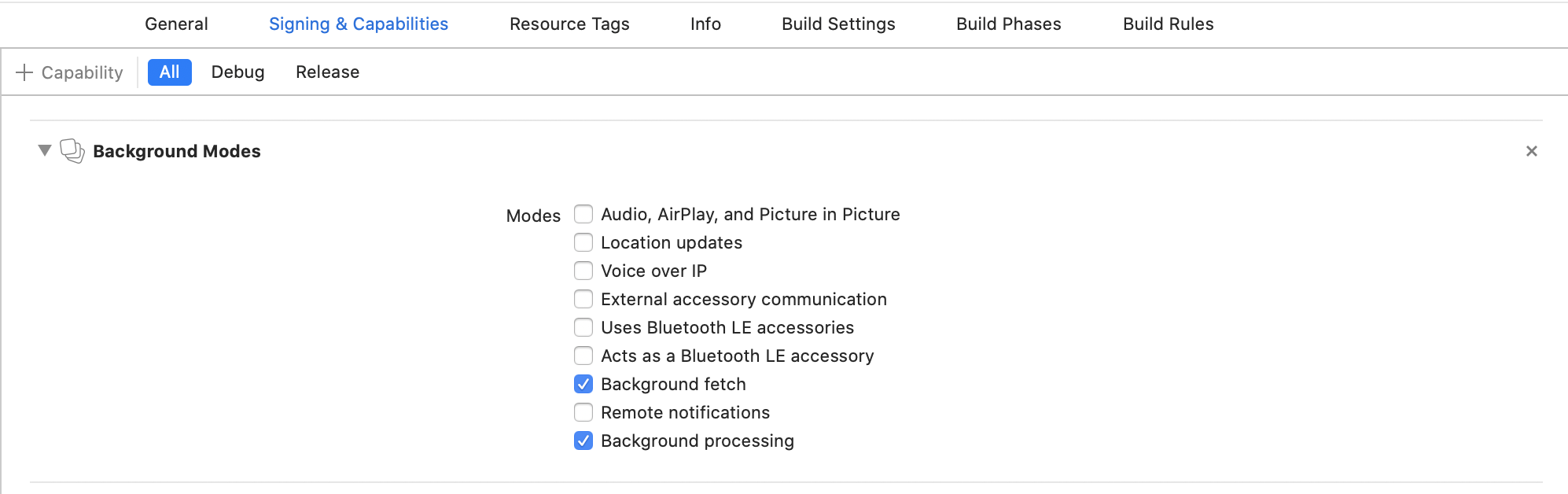
Select the root of your project. Select Capabilities tab. Enable Background Modes and enable the following mode:
- Background fetch
 #### Configure Info.plist (iOS 13+)
Open your Info.plist and add the key "Permitted background task scheduler identifiers"
#### Configure Info.plist (iOS 13+)
Open your Info.plist and add the key "Permitted background task scheduler identifiers"
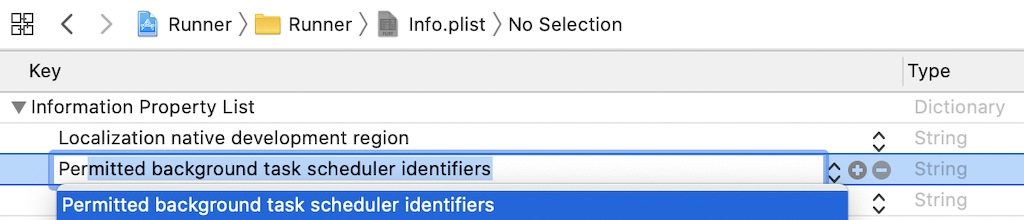 Add the required identifier com.transistorsoft.fetch.
 #### AppDelegate.m (iOS 13+)
```diff
#import "AppDelegate.h"
#import
#import
#import
+//IMPORTANT: Paste import ABOVE the DEBUG macro
+#import
#if DEBUG
.
. ///////////////////////////////////////////////////////////////////////////////////
. // IMPORTANT: DO NOT paste import within DEBUG macro or archiving will fail!!!
. ///////////////////////////////////////////////////////////////////////////////////
.
#endif
@implementation AppDelegate
(BOOL)application:(UIApplication *)application didFinishLaunchingWithOptions:(NSDictionary *)launchOptions {
.
.
.
+//[REQUIRED] Register BackgroundFetch
+[[TSBackgroundFetch sharedInstance] didFinishLaunching];
return YES;
}
```
### Android
#### android/build.gradle
```diff
allprojects {
repositories {
mavenLocal()
maven {
// All of React Native (JS, Obj-C sources, Android binaries) is installed from npm
url("$rootDir/../node_modules/react-native/android")
}
maven {
// Android JSC is installed from npm
url("$rootDir/../node_modules/jsc-android/dist")
}
+ maven {
+ // react-native-background-fetch
+ url("${project(':react-native-background-fetch').projectDir}/libs")
+ }
}
}
```
#### Configure proguard-rules.pro
If you're using __`minifyEnabled true`__ with your Android release build, the plugin's __`HeadlessTask`__ class will be mistakenly *removed* and you will have [this crash](https://github.com/transistorsoft/react-native-background-fetch/issues/261).
1. Edit `android/app/proguard-rules.pro`.
2. Add the following rule:
```bash
# [react-native-background-fetch]
-keep class com.transistorsoft.rnbackgroundfetch.HeadlessTask { *; }
```
## Issues, suggestions and feature requests
https://github.com/IncentroBA/backgroundTask/issues
## Development and contribution
- Bart Onstee
- https://github.com/transistorsoft/react-native-background-fetch
#### AppDelegate.m (iOS 13+)
```diff
#import "AppDelegate.h"
#import
#import
#import
+//IMPORTANT: Paste import ABOVE the DEBUG macro
+#import
#if DEBUG
.
. ///////////////////////////////////////////////////////////////////////////////////
. // IMPORTANT: DO NOT paste import within DEBUG macro or archiving will fail!!!
. ///////////////////////////////////////////////////////////////////////////////////
.
#endif
@implementation AppDelegate
(BOOL)application:(UIApplication *)application didFinishLaunchingWithOptions:(NSDictionary *)launchOptions {
.
.
.
+//[REQUIRED] Register BackgroundFetch
+[[TSBackgroundFetch sharedInstance] didFinishLaunching];
return YES;
}
```
### Android
#### android/build.gradle
```diff
allprojects {
repositories {
mavenLocal()
maven {
// All of React Native (JS, Obj-C sources, Android binaries) is installed from npm
url("$rootDir/../node_modules/react-native/android")
}
maven {
// Android JSC is installed from npm
url("$rootDir/../node_modules/jsc-android/dist")
}
+ maven {
+ // react-native-background-fetch
+ url("${project(':react-native-background-fetch').projectDir}/libs")
+ }
}
}
```
#### Configure proguard-rules.pro
If you're using __`minifyEnabled true`__ with your Android release build, the plugin's __`HeadlessTask`__ class will be mistakenly *removed* and you will have [this crash](https://github.com/transistorsoft/react-native-background-fetch/issues/261).
1. Edit `android/app/proguard-rules.pro`.
2. Add the following rule:
```bash
# [react-native-background-fetch]
-keep class com.transistorsoft.rnbackgroundfetch.HeadlessTask { *; }
```
## Issues, suggestions and feature requests
https://github.com/IncentroBA/backgroundTask/issues
## Development and contribution
- Bart Onstee
- https://github.com/transistorsoft/react-native-background-fetch