
BackgroundTask
Call a nanoflow when app is in background based on the BackgroundFetch API for Android and iOS.
Features
Background Fetch is a very simple plugin which attempts to awaken an app in the background about every 15 minutes, providing a short period of background running-time.
This widget is build to incorporate the https://github.com/transistorsoft/react-native-background-fetch into Mendix Native apps
iOS
- There is no way to increase the rate which a fetch-event occurs and this plugin sets the rate to the most frequent possible — you will never receive an event faster than 15 minutes. The operating-system will automatically throttle the rate the background-fetch events occur based upon usage patterns. Eg: if user hasn't turned on their phone for a long period of time, fetch events will occur less frequently.
scheduleTaskseems only to fire when the device is plugged into power.- ⚠️ When your app is terminated, iOS no longer fires events — There is no such thing as
stopOnTerminate: falsefor iOS. - iOS can take days before Apple's machine-learning algorithm settles in and begins regularly firing events. Do not sit staring at your logs waiting for an event to fire. If your simulated events work, that's all you need to know that everything is correctly configured.
- If the user doesn't open your iOS app for long periods of time, iOS will stop firing events.
Android
- The Android plugin provides a HeadlessJS implementation allowing you to continue handling events even after app-termination (see
@config enableHeadless)
Usage
- Clone this Git
- Go to cloned directory
- Run: npm i
- Run: cd ios && pod install
- Follow steps below:
iOS
Select the root of your project. Select Capabilities tab. Enable Background Modes and enable the following mode:
- Background fetch
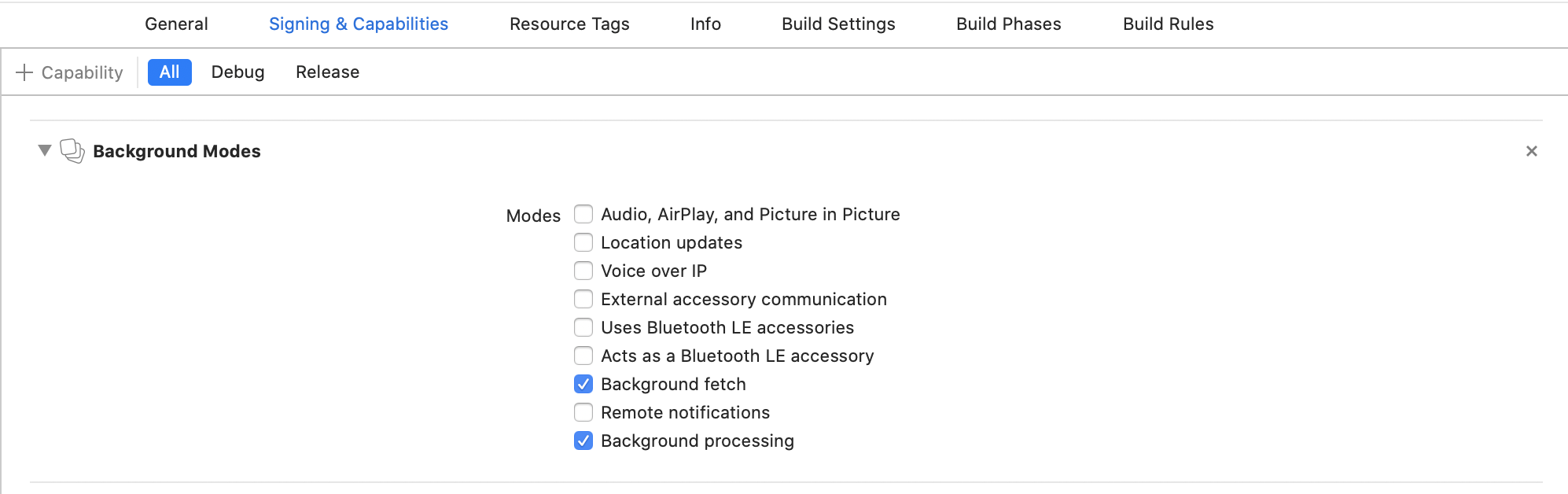
Configure Info.plist (iOS 13+)
Open your Info.plist and add the key "Permitted background task scheduler identifiers"
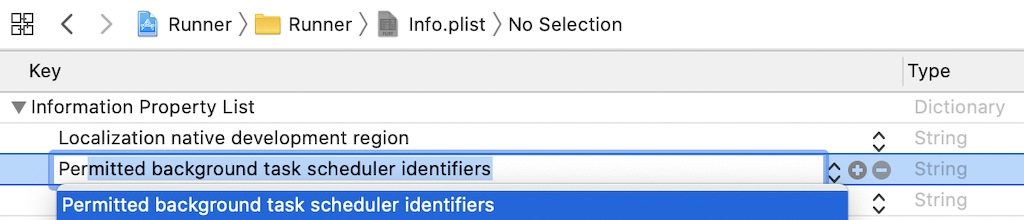
Add the required identifier com.transistorsoft.fetch.

AppDelegate.m (iOS 13+)
#import "AppDelegate.h"

#import <React/RCTBridge.h>
#import <React/RCTBundleURLProvider.h>
#import <React/RCTRootView.h>

+//IMPORTANT:  Paste import ABOVE the DEBUG macro
+#import <TSBackgroundFetch/TSBackgroundFetch.h>

#if DEBUG
.
. ///////////////////////////////////////////////////////////////////////////////////
. // IMPORTANT:  DO NOT paste import within DEBUG macro or archiving will fail!!!
. ///////////////////////////////////////////////////////////////////////////////////
.
#endif

@implementation AppDelegate

(BOOL)application:(UIApplication *)application didFinishLaunchingWithOptions:(NSDictionary *)launchOptions {
  .
  .
  .
+//[REQUIRED] Register BackgroundFetch
+[[TSBackgroundFetch sharedInstance] didFinishLaunching];

  return YES;
}
Android
android/build.gradle
allprojects {
    repositories {
        mavenLocal()
        maven {
            // All of React Native (JS, Obj-C sources, Android binaries) is installed from npm
            url("$rootDir/../node_modules/react-native/android")
        }
        maven {
            // Android JSC is installed from npm
            url("$rootDir/../node_modules/jsc-android/dist")
        }
+       maven {
+           // react-native-background-fetch
+           url("${project(':react-native-background-fetch').projectDir}/libs")
+       }

    }
}
Configure proguard-rules.pro
If you're using minifyEnabled true with your Android release build, the plugin's HeadlessTask class will be mistakenly removed and you will have this crash.
- Edit
android/app/proguard-rules.pro. - Add the following rule:
# [react-native-background-fetch]
-keep class com.transistorsoft.rnbackgroundfetch.HeadlessTask { *; }
Debug Xcode command:
e -l objc -- (void)[[BGTaskScheduler sharedScheduler] _simulateLaunchForTaskWithIdentifier:@"com.transistorsoft.fetch"]
Issues, suggestions and feature requests
https://github.com/IncentroBA/backgroundTask/issues