
1.7 KiB
1.7 KiB
BackgroundTask
[Call a nanoflow when app is in background]
Features
[feature highlights]
Usage
- Clone this Git
- Go to cloned directory
- Run: npm i
- Run: cd ios && pod install
- Follow steps below:
iOS Select the root of your project. Select Capabilities tab. Enable Background Modes and enable the following mode:
Background fetch
Background processing (🆕 iOS 13+; Only if you intend to use BackgroundFetch.scheduleTask)
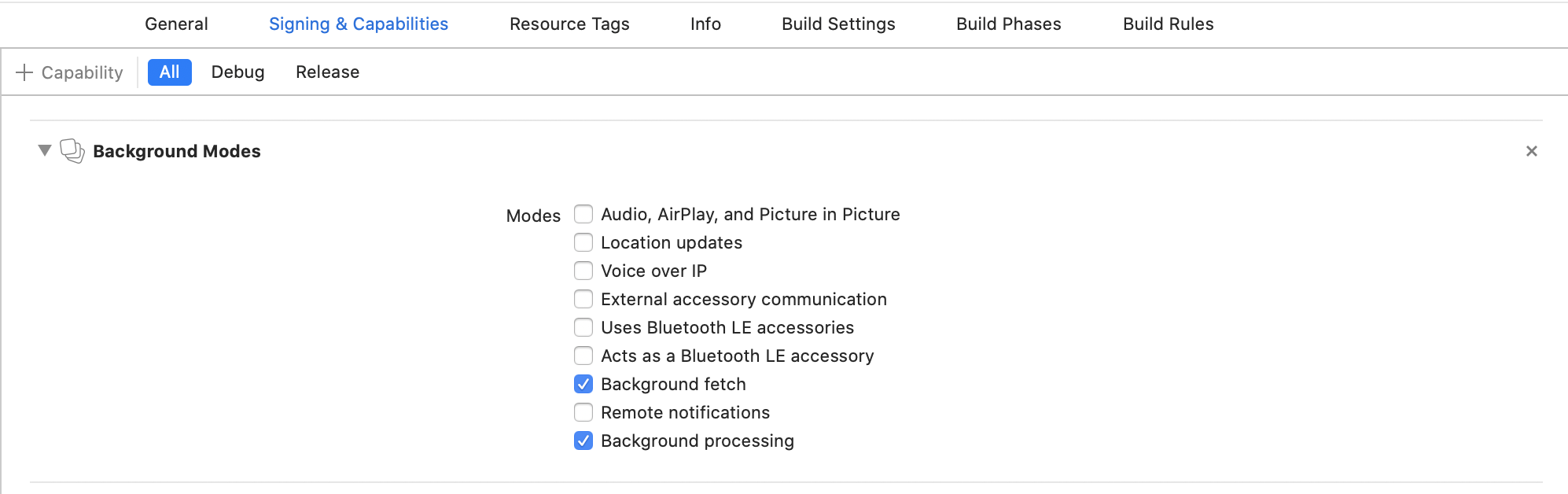
Configure Info.plist (iOS 13+)
Open your Info.plist and add the key "Permitted background task scheduler identifiers"
<img width="512" alt="68747470733a2f2f646c2e64726f70626f7875736572636f6e74656e742e636f6d2f732f7435786667616832676768717477732f696f732d73657475702d7065726d69747465642d6964656e746966696572732e706e673f646c3d31" src="https://user-images.githubusercontent.com/66774568/112835629-cf76d680-9099-11eb-8359-b87fb417a922.png">

Add the required identifier com.transistorsoft.fetch.
<img width="512" alt="68747470733a2f2f646c2e64726f70626f7875736572636f6e74656e742e636f6d2f732f6b7764696f327272323536643835322f696f732d73657475702d7065726d69747465642d6964656e746966696572732d6164642e706e673f646c3d31" src="https://user-images.githubusercontent.com/66774568/112835829-16fd6280-909a-11eb-87f4-42a6cff4e025.png">
Demo project
[link to sandbox]
Issues, suggestions and feature requests
[link to GitHub issues]
Development and contribution
[specify contribute]